
What Is a FinOps LinkedIn Promotional Post?
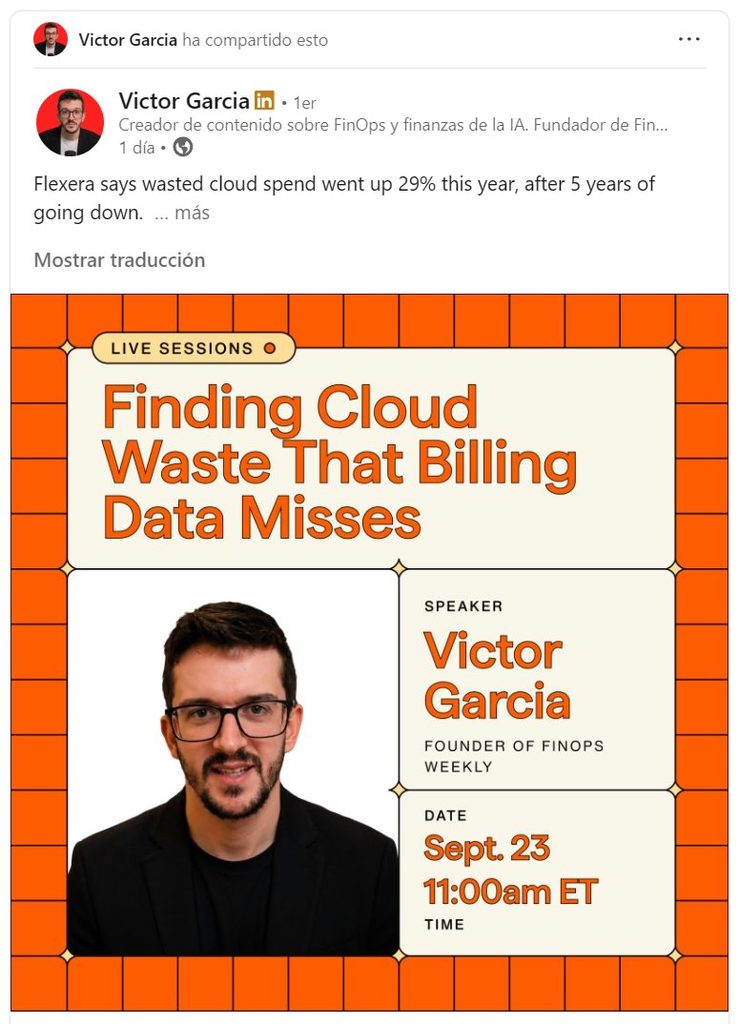
The Promotional Image Post is a high-impact social media placement on our most authoritative LinkedIn profiles. Instead of a corporate post on a company page, your message is shared organically by community leaders, leading to significantly higher trust and reach.
We use our understanding of the LinkedIn algorithm to ensure your image and copy generate maximum debate and visibility within the global FinOps community.
What You’ll Get
- Featured Social Media Post on high-authority LinkedIn profiles (Victor Garcia / Damian Munafo).
- Organic Reach:
- 1,000 – 2,000+ Impressions (Baseline)
- 20 – 30 Engagements (Average likes/comments)
- Community Reposting: We reshare the post within our specialized LinkedIn Groups (FinOps Global Community).
- Engagement Report: Performance metrics delivered after the post has completed its primary organic cycle.
How the FinOps LinkedIn Advertising Process Works
Step 1 – Book Your Post Date
Contact us to reserve your slot in our social media calendar. We limit promotional posts to ensure high quality and audience engagement.
Step 2 – Submit Your Materials
Log in to the SmartClouds Portal and complete the social media submission form. This follows the same simple process as a newsletter ad.
Step 3 – Editorial Review & Optimisation
Our team reviews your image and copy. We may suggest “hooks” or formatting changes to the text to better trigger the social media algorithms.
Step 4 – Post Goes Live
The post is published from a high-authority personal profile and actively managed by our team to encourage comments and engagement.
Step 5 – Performance Tracking
A summary of the post’s performance (impressions, likes, comments, and clicks) is provided once the organic reach has stabilized.
Materials Required
| Material | Format | Requirements | Deadline |
|---|---|---|---|
| Post Copy | Plain text | Catchy hook and clear CTA (max 1,200 chars) | Sunday before post date |
| Ad Image | JPG/PNG | High-quality graphic or professional photo | Sunday before post date |
| Image Guidelines | Plain text | Optional if you want us to design the graphic | Sunday before post date |
| CTA Link | URL | The destination for the “Link in Comments” or post body | Sunday before post date |
Timeline at a Glance
| Day | What happens |
|---|---|
| Booking confirmed | Date reserved in our social media calendar |
| Sunday (before post) | Materials submission deadline |
| Within 2 business days | Editorial review and algorithm optimization |
| Scheduled Date | Post goes live on LinkedIn |
| Following Friday | Performance summary delivered |
Frequently Asked Questions
Can we provide our own image?
Yes. You can provide the final graphic or simply give us brand guidelines and let us design it to fit our community style.
Why is this better than a LinkedIn Ad?
People trust people. A post coming from a recognized industry leader feels like a recommendation rather than an interruption. This leads to higher quality leads and better brand sentiment.
Where exactly is this posted?
The post is primarily shared on the personal profiles of our community leads (Victor Garcia or Damian Munafo) and then reshared to our private and public LinkedIn groups.
How to Get Started
Submit your image and copy through the SmartClouds Portal using the social media submission form. If you haven’t booked your date yet, contact us to check availability.
